
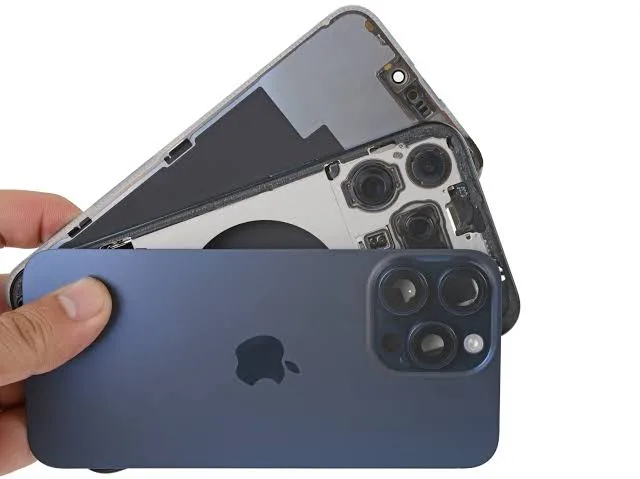
How to Fix Iphone 15 Pro Max Rattling Noise
A rattling noise inside an iPhone 15 Pro Max is most commonly caused by the mechanical Sensor-Shift Optical Image Stabilization (OIS) and 3D sensor-shift tetraprism (5x telephoto) modules floating freely within their Voice Coil Motor (VCM) enclosures when unpowered—a normal physical characteristic of the device. However, if the rattle persists while the camera is active, occurs specifically during haptic feedback, or sounds like a heavy internal component shifting after a physical drop, the cause can range from loose titanium button tolerances to backed-out internal Taptic Engine screws or compromised battery adhesive.
Quick Diagnostic Matrix
| Sound & Symptom | Context / Trigger | Root Cause | Recommended Action / Fix |
| Light, high-frequency rattle near camera bump | Shaking phone while locked or camera is OFF | Unpowered sensor-shift and 5x tetraprism mechanics resting on suspension rails | Normal behavior. Do not vigorously shake; noise vanishes when Camera app is opened. |
| Rattle disappears when holding side buttons | Shaking or tapping edges of phone | Natural clearance tolerances between the Grade 5 titanium frame and physical buttons | Normal mechanical tolerance. Fit a form-fitting protective case with covered button caps. |
| Rattle occurs during incoming calls or haptic taps | Phone vibrates; audible buzzing or mechanical rattle from bottom | Loose Taptic Engine grounding screws or dislodged internal bracket | Open chassis, clean screw threads, apply low-strength threadlocker, and re-torque screws. |
| Persistent rattle with camera ON + jittery preview | Camera app active (1x or 5x); blurry focus or buzzing sound | Fractured VCM suspension springs or broken internal lens stabilizer | Camera hardware damaged (often motorcycle vibrations or drops); replace rear camera module. |
| Dull, heavy thud or shifting weight inside phone | Tilting or lightly tapping back glass | Failed stretch-release battery adhesive or loose internal shield plate | Open device, inspect battery pouch, and reinstall fresh OEM battery adhesive pull-tabs. |
1. The Camera Sensor-Shift & Tetraprism Float Test
The iPhone 15 Pro Max features a 48MP main sensor mounted on a second-generation sensor-shift system and a 12MP 5x telephoto lens using an internal tetraprism with 3D sensor-shift optical stabilization.
[Unpowered State (Camera App Closed)]
 ┌────────────────────────────────────────────────────────┐
 │ Camera Module Enclosure                                │
 │   ┌──────────────────────────┐                         │
 │   │ Suspended 48MP Sensor    │ <── Sensor rests freely on mechanical guide rails
 │   └─────────────┬────────────┘     (Rattles when shaken without power)
 └─────────────────┼──────────────────────────────────────┘
                   │ Camera App Opened (1x or 5x Selected)
                   ▼
 ┌────────────────────────────────────────────────────────┐
 │ Voice Coil Electromagnets Energized                    │
 │ ──► Magnetic levitation actively centers the sensor    │
 │ ──► RATTLE VANISHES INSTANTLY                          │
 └────────────────────────────────────────────────────────┘
- Perform the Float Verification Test:
- Hold the iPhone near your ear and shake it gently back and forth while the screen is locked. You will hear a distinct mechanical rattle coming from the top-right camera island.
- Unlock the phone and open the native Camera app.
- Ensure you are on the 1x main camera, then gently shake the phone again.
- Switch to the 5x telephoto camera and repeat the gentle shake.
- Evaluate the Result:
- The rattle stops or becomes nearly inaudible: The phone is operating normally. When the camera is unpowered, the voice coil electromagnets are de-energized, leaving the sensor and prism suspended on miniature precision guide springs. Once the app launches, current flows through the coils, locking the sensor in an active magnetic field.
- The rattle continues unabated, or the preview jitters violently: The internal suspension springs or guide pins have physically fractured, requiring a module replacement (see Section 5).
Warning: Do not repeatedly or vigorously shake the iPhone to test this sound. Forcing the unpowered sensor carriage to slam against its physical end-stops can fatigue the microscopic suspension leaf springs over time.
2. Test Physical Button Tolerances
The iPhone 15 Pro Max features a Grade 5 titanium frame housing four mechanical switches: the Action button, Volume Up, Volume Down, and the Side (Power) button. To prevent buttons from binding due to thermal expansion or pocket lint ingress, Apple machines slight micro-clearance tolerances into each button cutout.
[Button Clearance Cross-Section]
 [Titanium Outer Frame]
   ├── [Micro-Gap: ~0.05mm - 0.1mm] ◄── Allows button to move without binding
   └── [Titanium Button Cap]
         └── [Internal Silicone Gasket & Membrane Switch]
- Place your index finger firmly over the Action button and both Volume buttons.
- Place your thumb firmly over the Side (Power) button.
- With all four buttons held securely down against their silicone gaskets, shake the phone.
- Evaluate the Result:
- If the rattle disappears entirely, the sound was simply the button caps shifting inside their titanium frame channels.
- Fix: This is a cosmetic characteristic of mechanical button assemblies. Installing a protective case (such as Apple Silicon, Spigen, or OtterBox) that encases the button caps will isolate the movement and eliminate the sound completely.
3. Diagnose Taptic Engine & Internal Fastener Rattle
If the rattling noise sounds like loose metal-on-metal vibration whenever the phone rings, plays a notification, or renders keyboard haptics, the issue is located in the lower chassis around the Taptic Engine.
[Lower Chassis Component Layout]
 ┌────────────────────────────────────────────────────────┐
 │ Internal Logic Board / Lower Sub-assembly              │
 │   ┌──────────────────────────┐  ┌──────────────────┐   │
 │   │ Taptic Engine Assembly   │  │ Bottom Speaker   │   │
 │   │ (Secured by Tri-Point    │  │ Acoustic Chamber │   │
 │   │  & Standoff Screws)      │  │                  │   │
 │   └─────────────┬────────────┘  └──────────────────┘   │
 └─────────────────┼──────────────────────────────────────┘
                   │ Severe Drop / Thermal Shock
                   ▼
 [Loose Screw Backs Out ──► Vibrates Violently During Haptic Feedback]
- Verify Haptic Isolation:
- Go to Settings > Sounds & Haptics.
- Toggle Haptics between Always Play and Never Play.
- Scroll down to Ringtone and select a rhythmic alert (such as Reflection).
- If the phone buzzes cleanly when resting on a table but emits an audible mechanical rattle when picked up mid-vibration, an internal screw has backed out.
- The Hardware Remedy:
- Open the display or back glass (using standard Apple-certified heating and suction fixtures).
- Inspect the three Tri-point screws securing the Taptic Engine bracket and grounding strap to the frame.
- If loose, remove the screws, clean any stripped threading, apply a trace amount of low-strength blue threadlocker, and torque the screws to OEM specifications ($0.45text{–}0.50text{ kgf}cdottext{cm}$).
4. Check for Shifting Battery or Dislodged Internal Plates
If the phone was subjected to a hard drop onto concrete or underwent a third-party rear glass/battery replacement, the internal battery may have torn its stretch-release adhesive strips.
[Battery Cavity Profile]
 ┌────────────────────────────────────────────────────────┐
 │ Midframe Chassis Wall                                  │
 │   ┌────────────────────────────────────────────────┐   │
 │   │ iPhone 15 Pro Max Battery (L-Shaped Cell)      │   │
 │   │ ░░░░░░░░░░░░░░░░░░░░░░░░░░░░░░░░░░░░░░░░░░░░░ │ <── Broken pull-tabs
 │   │ [=== Compromised / Torn Adhesive Strips ===]   │     allow cell to slide
 │   └────────────────────────────────────────────────┘   │     0.5mm against frame
 └────────────────────────────────────────────────────────┘
- The Weight-Shift Test:
- Hold the phone flat in the palm of your hand, screen facing up.
- Slowly tilt the phone left-to-right, then top-to-bottom.
- If you feel a dull “thud” or a tactile shift in mass inside the phone, the battery adhesive has let go, allowing the heavy lithium-ion pack to slide inside the aluminum midframe cavity.
- The Fix:
- Continuing to use an iPhone with an unanchored battery is dangerous; physical friction between the battery pouch and internal metal standoff edges can puncture the cell, leading to swelling or thermal runaway.
- The phone must be opened, the battery extracted, the cavity cleared of old adhesive residue with 99% isopropyl alcohol, and new pre-cut OEM stretch-release adhesive strips installed.
5. Replace Damaged Camera Modules (Broken Voice Coil Motors)
When an iPhone 15 Pro Max is subjected to the high-amplitude, high-frequency engine vibrations of a motorcycle or an intense direct drop onto the camera bezel, the OIS suspension system suffers structural failure.
[Damaged Voice Coil Motor Mechanism]
 Engine Resonance / Severe Drop Impact
                 │
                 ▼
 Microscopic Guide Leaf Springs Bend or Snap
                 │
 ┌───────────────┴───────────────┐
 ▼                               ▼
Sensor Locked at Crooked Angle   Internal Magnets Slam Against Enclosure
(Viewfinder Blurry / Stuttering) (Persistent Loud Mechanical Rattle & Buzzing)
- Verify Permanent VCM Damage:
- Open the Camera app.
- Switch between 1x, 2x, and 5x.
- If the camera emits a loud, high-pitched mechanical buzzing, displays wavy “jello” video lines (rolling shutter distortion), or refuses to focus on distant objects while making a rapid ticking/rattling noise, the voice coil motor is mechanically ruined.
- Service & Repair Options:
- Because individual voice coils and leaf springs cannot be rebuilt at the component level, the entire rear triple-camera assembly must be swapped.
- Apple Limited Warranty / AppleCare+: If the phone has no external cracks or impact dents on the chassis, camera failure caused by failed stabilization is covered under Apple’s standard One-Year Warranty or AppleCare+ service fees.
- Self-Service / Independent Repair: If performing self-repair, order the authentic iPhone 15 Pro Max Rear Camera module via Apple’s Self Service Repair program. Third-party uncalibrated camera modules will trigger an “Unknown Part” notice in
Settings > General > Aboutand disable programmatic OIS and portrait-depth calibration tables.
If the rattling noise occurs exclusively when the phone is locked and vanishes the moment the Camera app is launched on 1x or 5x zoom, the device is operating strictly within manufacturer parameters and requires no repair. If the rattle persists while the camera viewfinder is active, accompanies corrupted focus tracking, or corresponds to a noticeable shifting of mass inside the lower half of the chassis, the device has suffered structural fatigue and must be disassembled to replace the rear camera module, re-torque the Taptic Engine fasteners, or re-adhere the battery pack.