
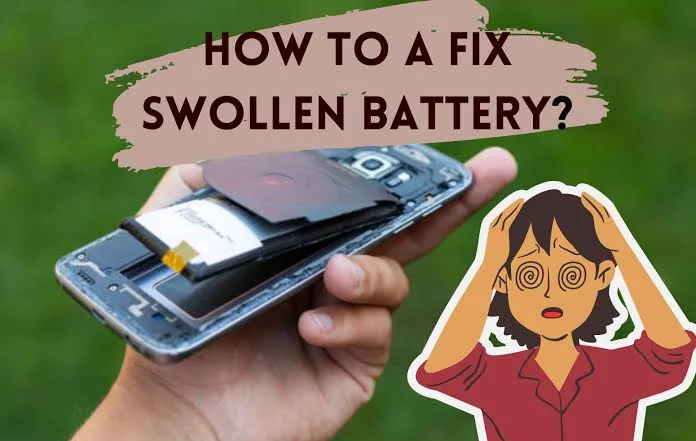
How to Fix Can I Use A Phone With A Swollen Battery
No, you cannot safely use, charge, or handle a phone with a swollen battery. A swollen battery indicates that the internal hermetic seal of a lithium-ion or lithium-polymer pouch cell is under pressure from combustible gas produced by chemical decomposition. Continuing to run current through the cell, applying mechanical pressure to the chassis, or carrying the device in a pocket creates a critical risk of internal short circuits, mechanical puncture, and catastrophic thermal runaway—resulting in an aggressive, self-sustaining metal-oxide fire that reaches temperatures over $600^circtext{C}$ ($1,100^circtext{F}$) and releases toxic hydrofluoric acid ($HF$) gas.
Quick Hazard & Diagnostic Matrix
| Observation | Underlying Mechanism | Risk Level | Immediate Action |
| Display lifting from frame / adhesive separated | Gas expansion forcing the OLED/glass assembly upward from the midframe | Extreme | Power off immediately; do not press down on the glass; disconnect chargers. |
| Rear glass or plastic panel bowing outward | Swelling pouch pushing against the backplate | Extreme | Stop use; isolate in a fireproof container or on a non-flammable surface. |
| Sweet, metallic, or acetone chemical odor | Punctured or ruptured pouch venting volatile organic carbonate solvents | Critical (Active Leak) | Evacuate room or ventilate area; do not inhale vapors; do not touch liquid residue. |
| Hissing sound, smoke, or rapid heat generation | Active internal short circuit initiating thermal runaway | Imminent Fire | Clear the area; submerge/smother in dry sand or use a Class D / clean agent fire extinguisher. |
| Chassis feels spongy when pressing center of screen | Internal gas pocket buffering between battery and display frame | Severe | Cease all charging; initiate safe battery removal and disposal workflow. |
1. The Chemical Cause of Battery Swelling
Lithium-ion cells consist of alternating layers of a cathode (typically lithium cobalt oxide, $text{LiCoO}_2$, or NMC), an anode (graphite), a porous polymer separator, and a liquid or gel electrolyte containing lithium hexafluorophosphate ($text{LiPF}_6$) dissolved in volatile organic carbonates (such as ethylene carbonate and dimethyl carbonate).
[Degraded Pouch Cell Anatomy]
 ┌────────────────────────────────────────────────────────┐
 │ Pouch Sealed Enclosure (Polymer-Aluminum Laminate)     │
 │   ┌────────────────────────────────────────────────┐   │
 │   │ Cathode (+) [LiCoO2]                           │   │
 │   │ ░░░░░░░░░░░░░░░░░░░░░░░░░░░░░░░░░░░░░░░░░░░░░ │ <── Trapped Gas: CO2, CO, H2, CH4
 │   │ [--- Compromised Porous Polymer Separator ---] │     (Pouch distends under pressure)
 │   │ Anode (-)   [Graphite with Li Plating]         │   │
 │   └────────────────────────────────────────────────┘   │
 └────────────────────────────────────────────────────────┘
Electrolyte Decomposition: Overcharging, high operating temperatures, deep over-discharging (below $2.5text{V}$), or manufacturing defects cause the solid electrolyte interphase (SEI) layer to break down. This chemical breakdown generates volatile gases, primarily carbon dioxide ($text{CO}_2$), carbon monoxide ($text{CO}$), hydrogen ($text{H}_2$), and light hydrocarbons (methane, ethylene).
Pressure Accumulation: Smartphone pouch cells lack the rigid cylindrical steel canisters used in power tools or laptops. They use a flexible, heat-sealed aluminum-polymer foil laminate. The pouch is designed to stretch and contain off-gassing to prevent instant rupture, causing the battery to swell noticeably.
Puncture Danger: As the pouch inflates, internal mechanical tension stretches the micro-porous polymer separator. The slightest external flex, drop, or localized pin-prick can tear the separator, allowing the high-energy cathode to touch the lithium-plated anode, producing an instant dead short.
2. Immediate Triage Protocol (Mitigate Thermal Runaway)
If your device exhibits physical chassis separation, bulging, or unexpected curvature, follow these steps immediately:
[Emergency Mitigation Steps]
 1. UNPLUG CHARGER IMMEDIATELY ──► Halts Joule heating and current-induced dendrite growth.
 2. SHUT DOWN THE PHONE       ──► Eliminates active discharge currents across the battery rail.
 3. DO NOT PRESS DOWN ON CASE ──► Prevents compressing the pouch against sharp internal screws.
 4. PLACE IN FIRE-SAFE ISOLATION ──► Metal bucket, sand bed, or bare concrete floor.
Disconnect Power: If the phone is charging, switch off the AC outlet before unplugging the cable. Never continue charging a swollen battery; applying current drives rapid Joule heating and accelerates electrolytic breakdown.
Power Off the Operating System: A standard software shutdown turns off the power management ICs (PMICs) and stops active discharge cycles, removing active electrical loads from the failing cell.
Do Not Squeeze or Clamp: Never attempt to press the screen back into the frame, tape the phone together, or sit on it. Pressing the frame forces the swollen pouch against internal motherboard shield tabs, standoff screws, or camera brackets, risking an internal puncture.
Isolate the Device: Place the phone in an open, well-ventilated location away from flammables (carpets, wood furniture, bedding). Optimal staging containers include:
A clean, empty metal pail or ammunition can.
A ceramic or clay planter.
A bucket filled with dry sand or coarse cat litter.
A bare outdoor concrete patio or garage floor.
3. Dangerous Misconceptions to Avoid
[CRITICAL HAZARDS: DO NOT ATTEMPT]
┌───────────────────────┬────────────────────────┐
│  Piercing the Pouch │ Freezing the Device │
├───────────────────────┼────────────────────────┤
│ Clamping Down Glass│ Standard Trash Bin │
└───────────────────────┴────────────────────────┘
 Piercing the Pouch │
Myth 1: Puncturing the Battery to Release Gas: Venting the gas with a pin, needle, or knife is exceptionally dangerous. The moment the metal tool or atmospheric oxygen breaches the interior laminate, oxygen contacts the lithium-intercalated graphite, triggering spontaneous ignition and flare jets. The vented gas is also highly toxic and irritates respiratory tracts.
Myth 2: Putting the Battery in the Freezer: Cold temperatures cause materials to contract unevenly. Moisture from atmospheric condensation will form inside the damaged seals, shorting the battery protection circuit module (PCM). When thawed, thermal shock can tear the weakened pouch foil.
Myth 3: Leaving it Plugged In to Back Up Data: If you do not have a recent cloud backup, attempting a full physical backup while the phone is hot or swelling creates a high risk of catastrophic failure. If data retrieval is critical, it must be performed only after the battery has cooled completely, in a fire-safe space, and using low-current USB ports—or ideally after replacing the swollen cell with a temporary shop battery.
4. Safe Removal and Battery Replacement
A swollen battery cannot be restored or repaired; it must be extracted and replaced with a new OEM-grade cell.
[Pouch Removal Clearance]
 ┌────────────────────────────────────────────────────────┐
 │ Midframe Chassis                                       │
 │   ┌──────────────────────────┐                         │
 │   │ Swollen Battery Pouch    │ ──► [NO METAL TOOLS]    │
 │   └─────────────┬────────────┘     [USE 99% IPA ONLY]  │
 │ ░░░░░░░░░░░░░░░░▼░░░░░░░░░░░░░░░░░░░░░░░░░░░░░░░░░░░░ │
 │ Structural Acrylic Adhesive Tape Layer (Dissolve Here) │
 └────────────────────────────────────────────────────────┘
Safety Gear: Wear safety goggles/glasses and heat-resistant nitrile gloves. Keep a small bucket of dry sand or a Class D / ABC dry-chemical fire extinguisher nearby.
Accessing the Cell:
Remove the display or rear panel according to your device’s service disassembly guidelines.
If applying heat to soften adhesive, never exceed $60^circtext{C}–70^circtext{C}$ ($140^circtext{F}–160^circtext{F}$). Do not apply direct hot air guns to the battery surface; apply heat only to the perimeter of the outer glass/frame.
Releasing the Adhesive:
Modern batteries are secured to the frame with stretch-release adhesive pull-tabs. If the pull-tabs break under the swollen cell, never use metal spatulas, screwdrivers, or razor blades to pry against the pouch.
Apply several drops of 99% anhydrous Isopropyl Alcohol (IPA) around the edges of the battery. Isopropyl alcohol dissolves structural acrylic tape within 2 to 3 minutes without reacting with lithium chemistry or conducting electricity.
Use a wide, flat ESD-safe plastic pry card or dental floss/nylon fishing line slid underneath the cell to cut through the softened adhesive.
Inspect Chassis and Reconnect:
After removal, inspect the display and frame. Frame warping must be addressed so that the replacement battery sits completely flat without structural pinch points.
Install an authentic, certified OEM replacement battery with fresh pre-cut adhesive strips.
5. Certified Disposal and Environmental Regulations
Swollen lithium batteries are classified as Class 9 Hazardous Materials and cannot be disposed of with regular municipal trash or curbside recycling. Compactors in standard garbage trucks easily crush batteries, causing severe waste vehicle and landfill fires.
[Battery Disposal Pathway]
 Swollen Battery Extracted
  └── Insulate Terminal Pins with Non-Conductive Kapton/Electrical Tape
       └── Place in Sealable Anti-Static / Fire-Resistant Bag
            └── Drop off at Certified Hazardous Waste / Call2Recycle Center
Tape the Contacts: Cover the exposed gold terminal contacts or ribbon connector pins with non-conductive electrical tape or polyimide (Kapton) tape to prevent accidental external short-circuits.
Package Safely: Place the cell in a dedicated fire-retardant lithium storage bag, a sealed plastic container filled with dry sand, or double-bag it in non-conductive plastic bags.
Drop-Off Locations: Deliver the battery to an authorized electronic waste drop-off site:
Municipal Household Hazardous Waste (HHW) facilities.
Major electronics retailers (such as Best Buy or certified repair centers) that accept damaged/swollen lithium cells.
Call2Recycle partner drop-off locations (verify in advance that the specific site accepts damaged/defective/recalled [DDR] batteries).